Appearance
What is SystemsLab?
SystemsLab is a service for running and analyzing performance benchmarks. It takes the fiddly, error-prone parts of benchmarking — provisioning hosts, running the same test across many variations, collecting results, and comparing them — and turns them into a repeatable workflow you drive from a single experiment specification.
You describe an experiment once. SystemsLab schedules it onto real hardware, runs it (once, or as a sweep over many parameter combinations), captures the results and system telemetry, and gives you high-level reports that make it easy to see what changed and why.
Key concepts
A few terms show up throughout the docs:
- Experiment — a single run of an experiment specification. It is made up of one or more jobs.
- Job — a unit of work scheduled onto a single host, made up of an ordered list of steps.
- Step — one action within a job (run a shell command, start a service, drive load, collect metrics). See the step reference.
- Context — a grouping that ties related experiments together (for example, every variant of a sweep) so their results can be reported on as a set.
How it fits together
A SystemsLab cluster has three main components:
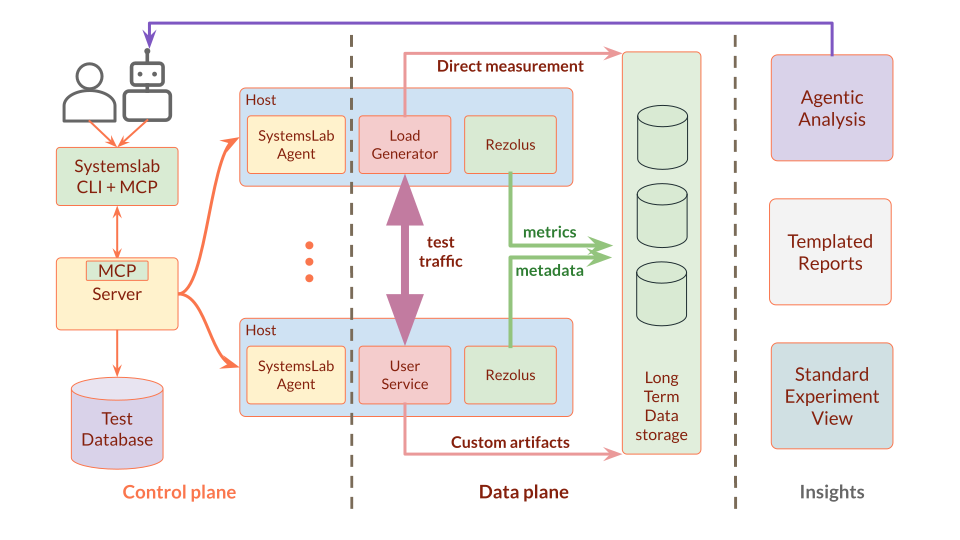
- Server — the controller. It serves the API and web frontend, schedules experiments onto hosts, drives the agents, and post-processes results.
- Agents — run on the benchmark hosts and execute the individual jobs the server assigns them.
- Database — stores all persistent state (experiments, jobs, artifacts) so nothing is lost if the server restarts.
You interact with the cluster through the systemslab CLI (submit experiments, tail logs, fetch artifacts), the web UI (browse experiments and reports), and an MCP server for driving SystemsLab from AI agents.
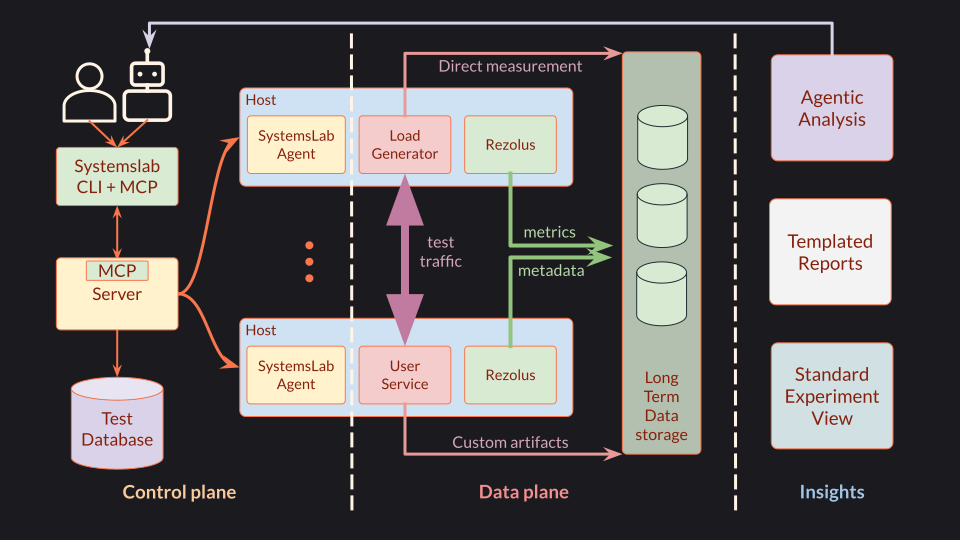
A cluster splits into a control plane (the server and its database, which schedule work and hold state) and a data plane (the agent hosts that generate load, run your service, and measure it with Rezolus). Metrics, metadata, and artifacts flow back to be archived and served to the user interface:
Want to get started right away? Head over to Getting Started, or walk through a real benchmark in the Redis tutorial. Setting up your own cluster? See the installation guide.