Skip to content

SystemsLabReproducible performance benchmarking

Describe a benchmark once, run it across every variation you care about, and get high-level reports that make regressions and wins obvious.

Why SystemsLab?

Benchmarking by hand doesn't scale. Results are hard to reproduce, "run it again with a bigger payload" means babysitting shell scripts, and comparing ten variations means ten spreadsheets. SystemsLab exists to make benchmarks:

  • Reproducible — an experiment is a versioned specification, not a pile of ad-hoc commands. Re-running it later gives you a comparable result.
  • Easy to vary — sweep over parameters (payload size, thread count, build flags, …) and SystemsLab runs every combination for you.
  • Comparable — results land in reports designed for comparison, so regressions and improvements are obvious at a glance.
  • Shared — experiments, results, and reports live on a server the whole team can reach, instead of on one laptop.

The core workflow

Working with SystemsLab follows the same loop whether you're testing a one-line change or sweeping a whole matrix:

  1. Write an experiment specification (JSON, YAML, or — most readably — Jsonnet) describing the jobs to run. Today, this step can often by done by an LLM agent.
  2. Submit it with the systemslab CLI, optionally as a sweep that expands into many variants.
  3. SystemsLab orchestrates the experiment and schedules each job onto a matching host, capturing output artifacts and system metrics along the way.
  4. View the results as a high-level report that summarizes and compares the runs and, in the case of a sweep, experiments.

At a higher level, using SystemsLab is a three-step loop — you author a config and submit it, SystemsLab runs everything for you, and then you explore the results:
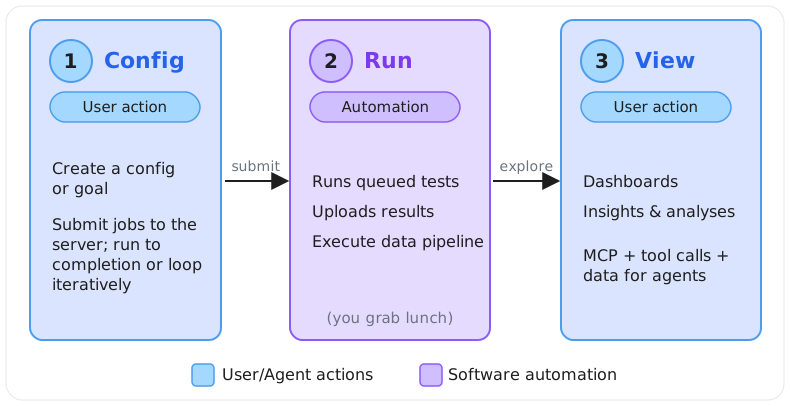
How SystemsLab works: Config, Run, View — user actions in blue, software automation in purple